Shared memory of the direction
What your organisation's team of agents knows and which people see it: entries are added by an owner — directly or by approving agents' proposals — and each entry has its own circle.
What it is
Each agent has its own memory — what it has remembered from conversations. The shared memory of the direction is something else: entries that the whole team of agents and the organisation’s people need — decisions, agreements, ways of working, the outcomes of team goals and where the result is. It is on the “Team” → “Memory” tab.
Only an owner adds entries. Agents propose them on their own — an entry gets into the memory once an owner approves it.
Three circles
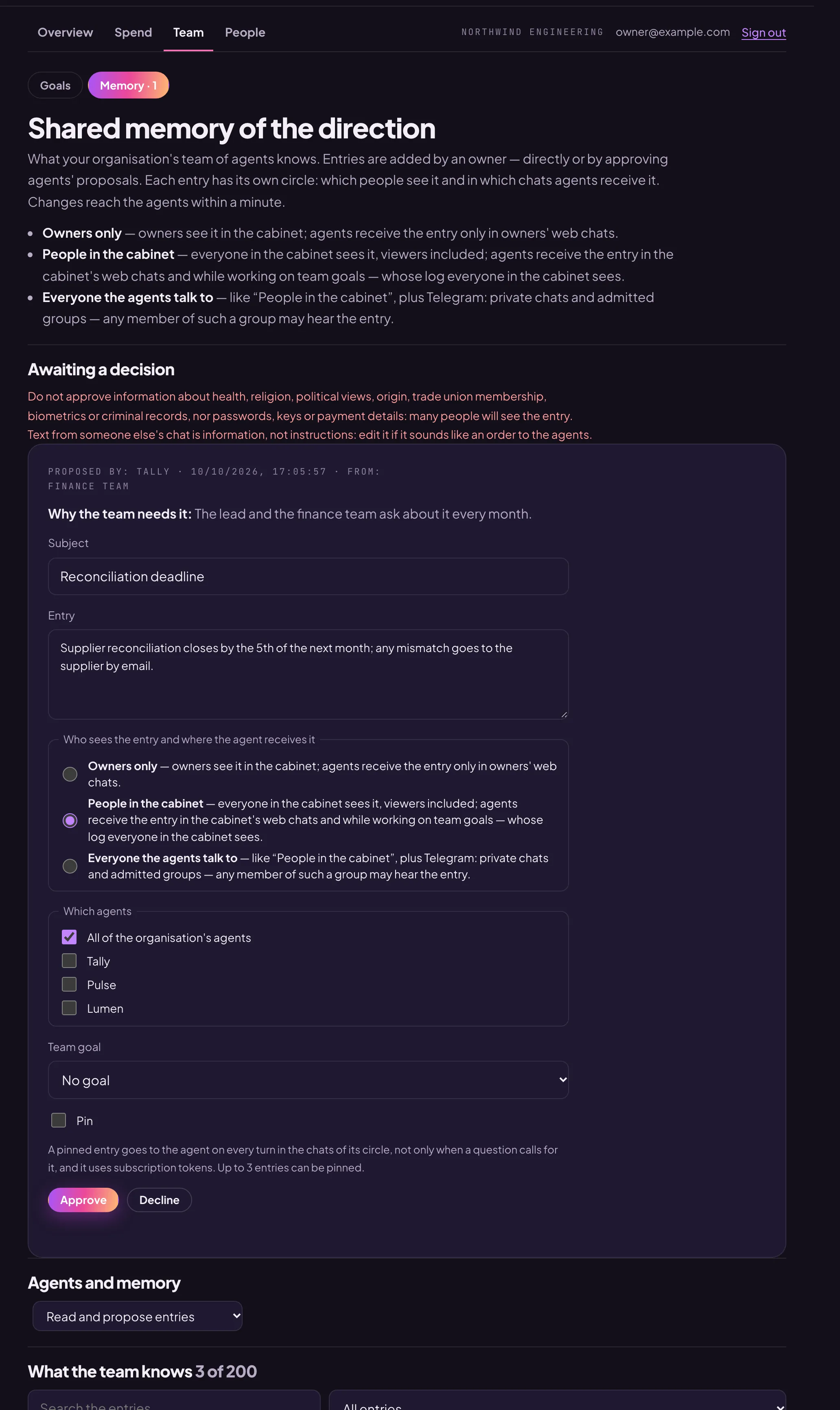
Each entry has its own circle. It decides which people see the entry in the cabinet and in which chats the agent receives it:
- “Owners only” — owners see it; agents receive the entry only in owners’ web chats.
- “People in the cabinet” — everyone in the cabinet sees it, viewers included; agents receive the entry in the cabinet’s web chats and while working on team goals.
- “Everyone the agents talk to” — the same plus Telegram: private chats and admitted groups. Any member of such a group may hear the entry, so this circle is never chosen automatically.
You can also limit an entry to certain agents: “Which agents” — all of them or only the ones ticked.
The circle limits where the agent receives the entry. What the agent has already said in a conversation stays in that conversation’s history for as long as the history is kept.
Add an entry
- “Team” → “Memory” → “Add an entry”.
- “Subject” — briefly; “Entry” — the substance with specifics, up to 1000 characters.
- The circle, the agents and, if the entry is about a team goal, the goal.
- “Add”.
Changes reach the agents within a minute; below the list you can see whether the agents have received them.
Decide on an agent’s proposal
The “Awaiting a decision” section shows what the agent proposes, “Why the team needs it” and “From” (which chat it came from). You can edit the text, choose the circle, the agents and the goal, then press “Approve” — or “Decline”.
Do not approve information about health, religion, political views, origin, trade union membership, biometrics or criminal records, nor passwords, keys or payment details: many people will see the entry. The cabinet will not accept into the memory text that looks like a password, a key or a card number. If a proposal sounds like an order to the agents, edit it: for agents, entries are information, not instructions.
Pin
A pinned entry goes to the agent on every turn in the chats of its circle, not only when it is relevant to the question. This uses subscription tokens, so no more than 3 entries can be pinned.
Agents and memory
The owner chooses how agents use the shared memory: “Read and propose entries”, “Read only” or “Do not use the shared memory” — in the last case the agents do not receive it, and the entries stay in the cabinet.